You will need to create a new installation and keep in step with the mods that are loaded.
You'll need Minecraft 1.16.4 to connect to the server
If you get errors about mods missing then come back here and check for updated mods. You can download them here and drop them in your .minecraft\mods folder.
forge-1.16.4-35.1.13-installer.jar - Download the Forge installer and double click to install the client.
Download and install the following files into your mods directory. It should be under your Appdata\Roaming\.minecraft folder
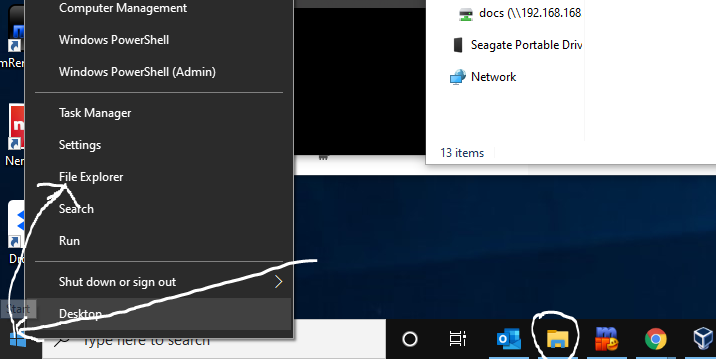
To get to your mods folder, click on the "File Manager" icon or right click the Windows Start button at the bottom right and select
"File Manager"
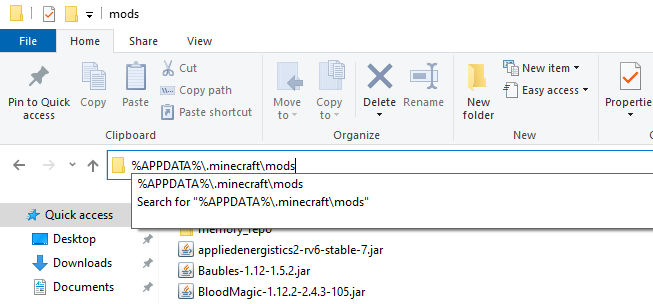
In the location bar within file manager, type %APPDATA%\.minecraft\mods
 These are obsolete but may be added later.
Chisel-MC1.12.2-1.0.2.45.jar
These are obsolete but may be added later.
Chisel-MC1.12.2-1.0.2.45.jar
CTM-MC1.12.2-1.0.2.31.jar
techguns-1.12.2-2.0.2.0_pre3.1.jar
appliedenergistics2-rv6-stable-7.jar
Baubles-1.12-1.5.2.jar
BloodMagic-1.12.2-2.4.3-105.jar
EnderCore-1.12.2-0.5.76.jar
EnderIO-1.12.2-5.2.59.jar
Guide-API-1.12-2.1.8-63.jar
Patchouli-1.0-20.jar
Thaumcraft-1.12.2-6.1.BETA26.jar
Mekanism-1.12.2-9.8.3.390.jar
ftb-essentials-1801.1.6-build.37.jar
ftb-library-forge-1801.3.5-build.109.jar
ftb-ranks-forge-1801.1.6-build.24.jar
architectury-3.7.26.jar
Once you have installed Minecraft 1.64.4 and Force 1.64.4 you will be able to launch and then connect to a server.
Use minecraft.nigelreed.net to connect.